KidLogger PRO için Uzaktan Kontrol Uygulaması
Android için KidLogger PRO uzaktan kumanda uygulamasını yayınladık. Bu uygulama, çocuklarının telefonuna KidLogger PRO uygulamasını kuran ebeveynler için tasarlanmıştır. Çocuğun o an ne yaptığını gerçek zamanlı olarak görmenizi sağlar.
Uyumluluk: Android 8–13
KidLogger Uzaktan Kumanda aracını buradan indirin.
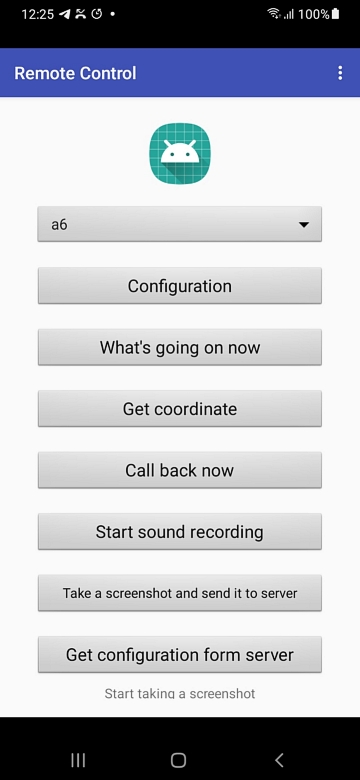
Ana pencerede birkaç izleme komutu görebilirsiniz:
İlk olarak, uygulamayı yapılandırmanız ve telefonunuz ile çocuğunuzun telefonu arasında bağlantı kurmanız gerekir. Configuration düğmesine tıklayın ve çocuğun adını, numarasını, cihaz kimliğini (ID) ve kendi telefon numaranızı yazın. Her iki telefonun da SMS gönderebilmesi gerekir. Yeni sürüm birden fazla telefonu kontrol etmeye olanak tanır.
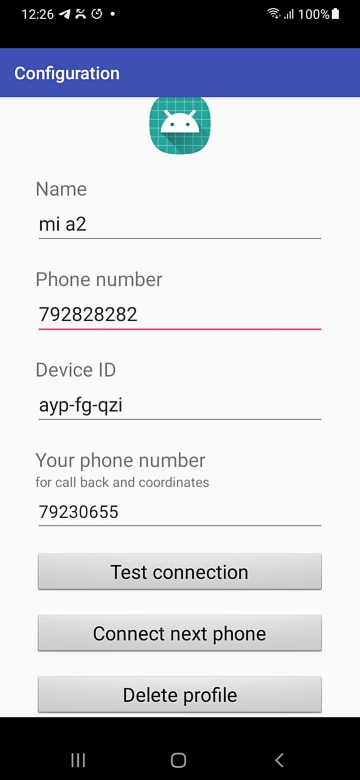
Bağlantıyı test etmek için Test connection düğmesine tıklayın. Eğer hedef telefonda KidLogger PRO (1.6.112 sürümü ve sonrası) aktifse, bağlantı kurulacaktır.
- "What's going on" komutu: Hedef telefonda şu anda hangi uygulamanın aktif olduğunu size bildirir.
- Get Coordinates: Telefonun güncel koordinatlarını bildirir. Hedef telefonda konum servisleri açık olmalıdır. Bilgi kutusundaki bağlantıya tıklayarak konumu Google Haritalar'da görebilirsiniz. Önemli: Hedef telefon uyku modunda olabilir. Uyandırmak için önce "Call back now" komutuna tıklayın ancak aramayı yanıtlamayın.
- Call Back Now: Hedef telefon otomatik olarak sizi arar ve telefonun çevresinde neler olup bittiğini duyabilirsiniz. Önemli: Bu arama yalnızca hedef telefon aktif kullanımda değilse gerçekleşir. Not: Önce hedef telefonda "Callback Setup" yapmanız gerekir.
- Start sound recording: KidLogger PRO uygulaması ortam sesini kaydetmeye başlar ve internet bağlantısı olduğunda gönderir.
- Take a screenshot: Hedef telefon bir ekran görüntüsü alır ve internet bağlantısı olduğunda sunucuya gönderir.
- Get configuration from server: Sunucuda bu cihaz için ayarları değiştirirseniz ve hemen uygulanmasını isterseniz bu düğmeye tıklayın.
Önerilerinizi bekliyoruz: Bu programa başka hangi özelliklerin eklenmesini istersiniz?
Fikirlerinizi paylaşmak için iletişim formumuzu kullanın.
Önemli:
1. Komut göndermek, yerel tarifenize bağlı olarak ücretlendirilir (bir komut = bir SMS).
2. Gizliliği artırmak için SMS mesajları telefonun hafızasına kaydedilmez.
3. Ebeveyn telefonuna Uzaktan Kumanda uygulamasıyla birlikte KidLogger PRO kurulması önerilmez.
Video: Ebeveynler için KidLogger PRO Uzaktan Kumanda
Eğer video oynatılmıyorsa YouTube üzerinden izleyin.
Sorun Giderme:
Bağlantı yok.
Uzaktan kumandada en önemli şey yapılandırmadır:
1. Kendi telefonunuzda KidLogger yüklü olmamalıdır; sadece uzaktan kumanda uygulaması olmalıdır.
2. Hedef telefonda en güncel KidLogger Pro sürümü yüklü olmalıdır;
3. Hedef telefondaki KidLogger PRO, KidLogger.net sitesine bağlı olmalıdır.
4. Her iki telefonda da SMS gönderme ve alma imkanı olmalıdır.
5. Uygulamalara SMS izinleri verilmiş olmalıdır.
6. Yapılandırma kısmında telefon numaralarını (alan kodlu ve alan kodsuz deneyin) ve cihaz kimliğini (ID) kontrol edin.